
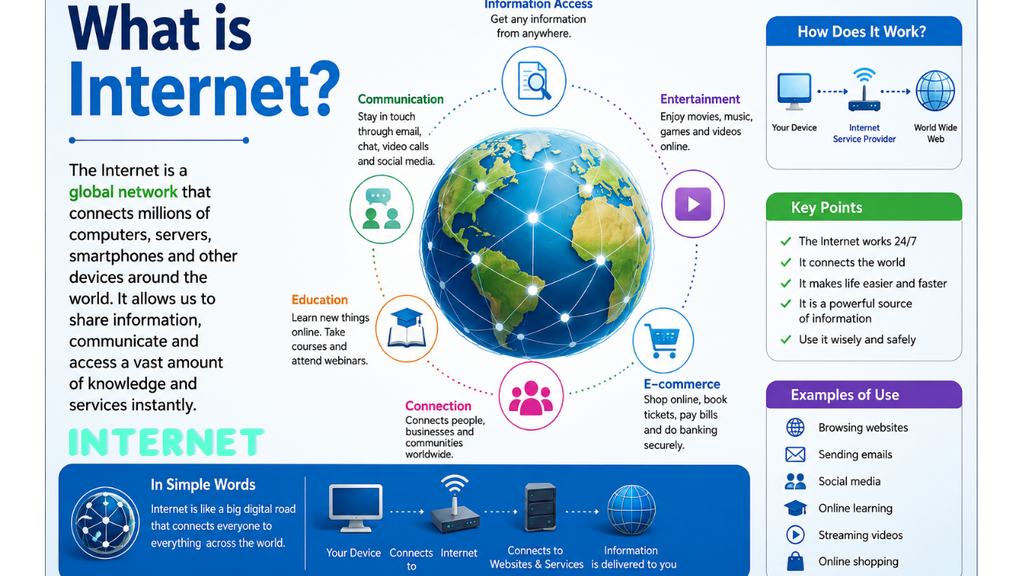
The Internet is a worldwide network of connected computers, smartphones, servers, and other devices that communicate with each other to share information and services.
In simple words:
Internet = A global network that connects millions of devices so they can communicate and exchange data.
For example, when you open YouTube, send a WhatsApp message, search Google, or make an online payment, you are using the Internet.
1. How does the Internet work?
Suppose you open a website such as a news website.
The basic process is:
Your Device → Wi-Fi/Mobile Network → ISP → Internet → Web Server → Internet → Your Device
Step-by-step
- You type a website address into your browser.
- Your device sends a request through your Wi-Fi or mobile network.
- Your ISP (Internet Service Provider) connects your device to the Internet.
- The request travels through different network devices and connections.
- The website’s server receives your request.
- The server sends the requested information back.
- Your browser receives the data and displays the webpage.
2. What is a Network?
A network is a group of connected devices that can communicate and share resources.
For example:
Computer ↔ Computer ↔ Printer
This is a small network.
The Internet is essentially a huge collection of interconnected networks around the world.
3. What is a Server?
A server is a computer system that provides data or services to other computers.
For example, when you watch a YouTube video, the video is stored on servers. Your device requests the video, and the server sends the video data to your device.
Example
Your phone → YouTube server → Video data → Your phone
Servers can store:
- Websites
- Videos
- Photos
- Documents
- Emails
- Applications
- Databases
4. What is a Client?
A client is a device or application that requests information or services from a server.
Examples:
- Smartphone
- Laptop
- Desktop computer
- Web browser
- Mobile application
For example:
Chrome = Client
Website server = Server
Chrome requests the webpage, and the server provides it.
5. What is an IP Address?
Every device connected to a network needs an address so data can reach the correct destination.
This address is called an IP address (Internet Protocol address).
Example:
192.168.1.10
Another type is IPv6, for example:
2001:db8::1
Think of an IP address like a postal address for a device on a network.
6. What is a Domain Name?
People don’t want to remember complicated IP addresses, so websites use easy names called domain names.
Example:
google.com
Instead of remembering the server’s IP address, you can type the domain name.
7. What is DNS?
DNS = Domain Name System
DNS converts a domain name into an IP address.
For example:
google.com → DNS → IP address
You can think of DNS as the Internet’s phone book.
It helps your computer find the server associated with a website name.
8. What is a Web Browser?
A web browser is software used to access websites on the Internet.
Examples:
- Google Chrome
- Microsoft Edge
- Mozilla Firefox
- Safari
- Opera
A browser sends requests to web servers and displays the information it receives.
9. What is a Website?
A website is a collection of webpages and other resources available through the Internet.
Examples:
- YouTube
- Wikipedia
- Amazon
A website may contain:
- Text
- Images
- Videos
- Audio
- Forms
- Animations
- Programs
10. What is a Webpage?
A webpage is an individual page that you can view in a web browser.
For example, a website may contain:
Home → About → Contact → Services
Each can be a separate webpage.
11. What is a URL?
URL = Uniform Resource Locator
A URL is the address used to locate a resource on the Internet.
Example:
It tells the browser where to find a particular resource.
Main parts
12. What is HTTP and HTTPS?
HTTP
HTTP = HyperText Transfer Protocol
It is a protocol used for transferring information between web browsers and web servers.
HTTPS
HTTPS = HyperText Transfer Protocol Secure
HTTPS provides encryption between your browser and the website.
You will commonly see:
https://
when a website uses HTTPS.
13. What is a Protocol?
A protocol is a set of rules that computers follow when communicating.
Important Internet protocols include:
| Protocol | Full Form | Main Use |
|---|---|---|
| HTTP | HyperText Transfer Protocol | Websites |
| HTTPS | HTTP Secure | Secure websites |
| TCP | Transmission Control Protocol | Reliable data transmission |
| IP | Internet Protocol | Addressing/routing |
| DNS | Domain Name System | Domain → IP |
| SMTP | Simple Mail Transfer Protocol | Sending email |
| IMAP | Internet Message Access Protocol | Receiving/managing email |
| FTP | File Transfer Protocol | File transfer |
14. What is a Packet?
When you send information over the Internet, the information is usually divided into small pieces called packets.
For example, imagine sending a large photo.
Instead of sending it as one huge piece:
Photo
it can be divided into:
Packet 1 + Packet 2 + Packet 3 + Packet 4 + …
These packets travel through the network and are reassembled at the destination.
15. What is a Router?
A router helps direct network traffic.
It determines where data should go next.
For example:
Your Computer → Router → ISP → Internet → Server
Your home Wi-Fi router connects your local devices to the wider network.
16. What is an ISP?
ISP = Internet Service Provider
An ISP provides Internet connectivity to customers.
Examples include companies such as:
- Jio
- Airtel
- BSNL
- Vi
Your ISP connects your home or phone to the Internet.
17. What is Wi-Fi?
Wi-Fi is a wireless networking technology.
It allows devices such as:
- Phones
- Laptops
- Smart TVs
- Tablets
to connect to a local network without using a physical Ethernet cable.
Important: Wi-Fi and the Internet are not the same thing.
You can have Wi-Fi without Internet access—for example, devices can communicate with each other through a local Wi-Fi network even when the Internet connection is down.
18. What is Mobile Internet?
Mobile Internet allows smartphones and other cellular devices to connect to the Internet through a mobile network.
Common generations include:
2G → 3G → 4G → 5G
5G generally provides higher capacity and lower latency than earlier generations, although actual performance depends on the network and location.
19. What is Email?
Email means electronic mail.
It allows people to send messages electronically over networks.
Examples:
- Gmail
- Outlook
- Yahoo Mail
A typical email can contain:
- Text
- Images
- Documents
- Links
- Other attachments
20. What is Cloud Computing?
Cloud computing means using computing resources over a network, usually the Internet, instead of relying entirely on your own computer.
Examples include online:
- Storage
- Software
- Databases
- Servers
- Backup services
For example, Google Drive allows you to store files on remote servers and access them from different devices.
21. What can we do with the Internet?
The Internet is used for many activities:
Education
- Online classes
- Tutorials
- Digital books
- Research
- Online exams
Communication
- Video calls
- Social media
Entertainment
- YouTube
- Streaming
- Online games
- Music
Banking
- Online banking
- Digital payments
- Bill payments
Shopping
- Online stores
- Product research
- Online orders
Work
- Remote work
- File sharing
- Video meetings
- Collaboration
22. Internet vs World Wide Web
These two terms are often confused.
Internet
The Internet is the worldwide network infrastructure connecting computers and networks.
World Wide Web
The Web (WWW) is a service that operates over the Internet and allows people to access interconnected webpages and websites using web browsers.
So:
Internet ≠ Web
The Web is one of the services that uses the Internet.
Other Internet-based services include email, online gaming, messaging, and file transfer.
23. Is the Internet owned by one company?
No.
There is no single company that owns the entire Internet.
The Internet consists of many interconnected networks operated by:
- Internet service providers
- Companies
- Universities
- Governments
- Data centers
- Organizations
- Individuals
They work together using common networking standards and protocols.
24. How does Google Search work?
When you search for something:
You → Google → Search systems → Results → Your browser
Search engines generally:
- Discover webpages.
- Store information about them in an index.
- Process your search query.
- Rank relevant results.
- Display results to you.
25. How does YouTube work?
When you select a video:
Your device → Internet → YouTube infrastructure → Video data → Your device
The video is delivered as data over the network and played by your device.
Modern video services also commonly use techniques such as caching and content delivery networks (CDNs) to deliver content efficiently from servers closer to users.
26. Advantages of the Internet
Fast communication
Easy access to information
Online education
Online banking
Online shopping
Entertainment
Remote work
File sharing
Global communication
Digital services
27. Disadvantages of the Internet
Online scams and fraud
Malware and viruses
Privacy risks
Cyberattacks
Fake information
Excessive screen time
Online harassment
Data theft
Internet addiction
So it is important to use the Internet safely.
28. Basic Internet Safety
Follow these rules:
Use strong, unique passwords.
Enable two-factor authentication where possible.
Don’t share passwords or OTPs.
Be careful with suspicious emails and links.
Check that important websites use HTTPS.
Keep your operating system and applications updated.
Don’t install applications from untrusted sources.
Be careful with online offers that seem too good to be true.
29. Simple Internet Diagram
              INTERNET
                  |
        ┌─────────┴─────────┐
        |                   |
      ISP                Data Center
        |                   |
      Router              Servers
        |                   |
   ┌────┼────┐        ┌─────┼─────┐
   |    |    |        |     |     |
 Phone Laptop TV    Website Email Video
30. In one sentence
The Internet is a global system of interconnected computer networks that uses standardized communication protocols to allow devices and people to exchange data and access services worldwide.
Pingback: LINK - hcomputer.in