
Uses of Email
Email (Electronic Mail) is a method of sending and receiving digital messages through the Internet. It is one of the most commonly used communication tools for personal, educational, business, and professional purposes.
What is Email?
Unlike traditional postal mail, email can send messages within seconds to people anywhere in the world. Along with text, users can also send documents, images, PDFs, videos, spreadsheets, presentations, and other files as attachments.
Example of an email address:harish@example.com
An email address generally contains:
- Username:
harish - @ symbol
- Domain name:
example.com
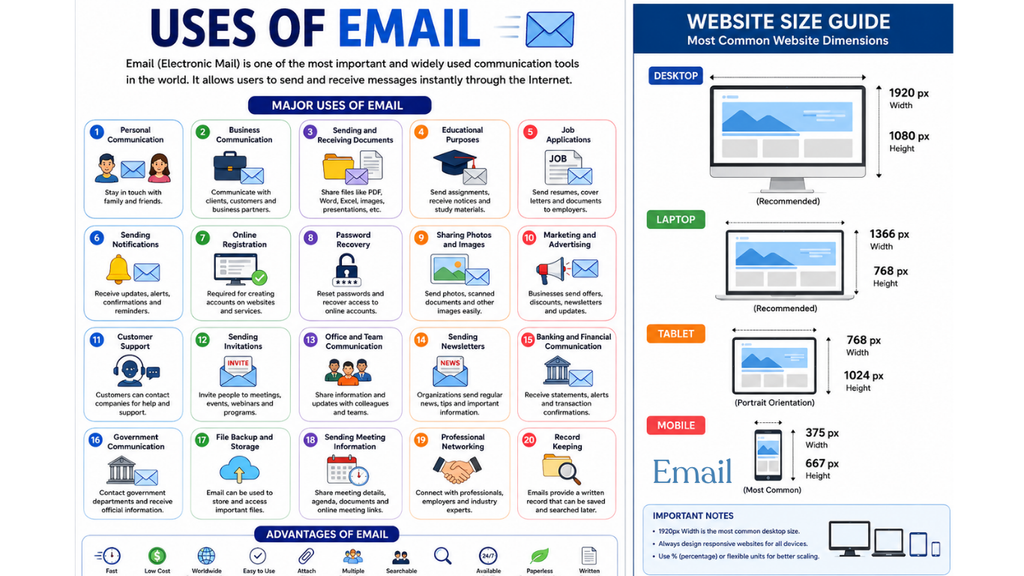
Major Uses of Email
1. Personal Communication
Email is widely used to communicate with friends, family members, and other people.
Examples:
- Sending greetings
- Sharing personal information
- Inviting someone to an event
- Sending photographs
- Staying in touch with relatives and friends
Email is particularly useful when a message needs to be more detailed than a short text message.
2. Business Communication
Email is an essential communication tool in offices and businesses.
Companies use email to communicate with:
- Employees
- Customers
- Suppliers
- Managers
- Business partners
- Clients
Examples:
- Sending quotations
- Discussing projects
- Sharing reports
- Confirming meetings
- Sending business proposals
- Communicating company announcements
3. Sending and Receiving Documents
One of the most important uses of email is sharing documents.
Users can attach files such as:
- PDF files
- MS Word documents
- MS Excel spreadsheets
- PowerPoint presentations
- Images
- ZIP files
- Text files
For example, a student can send an assignment to a teacher through email.
4. Educational Purposes
Email plays an important role in education.
Students and teachers use email for:
- Sending assignments
- Sharing study material
- Communicating with teachers
- Receiving notices
- Sending project reports
- Sharing examination information
- Applying for courses and scholarships
Example:
A student can send a completed project report to a teacher as a PDF attachment.
5. Job Applications
Email is commonly used for applying for jobs.
A job applicant can send:
- Resume/CV
- Cover letter
- Certificates
- Educational documents
- Experience letters
Example:
A candidate may send their CV to a company’s HR department through email.
6. Sending Notifications
Many websites and online services use email to send notifications.
Examples include:
- New account notifications
- Login alerts
- Payment confirmations
- Order confirmations
- Password reset messages
- Subscription notifications
- Appointment reminders
7. Online Registration
Email is often required when creating accounts on websites and applications.
For example, an email address may be required for:
- Social media accounts
- Online shopping
- Educational websites
- Banking services
- Government websites
- Job portals
- Online courses
The website may send a verification code or verification link to the registered email address.
8. Password Recovery
Email is very useful when a user forgets a password.
Usually, the user selects “Forgot Password”, enters their email address, and receives a password-reset link or verification code.
This helps users regain access to their accounts.
9. Sharing Photos and Images
Email allows users to send photographs and other images as attachments.
For example:
- Family photographs
- ID documents
- Scanned certificates
- Project images
- Business product images
10. Marketing and Advertising
Businesses use email for email marketing.
Companies may send customers:
- New product information
- Special offers
- Discounts
- Sales announcements
- Newsletters
- Product updates
Email marketing helps businesses communicate directly with their customers.
11. Customer Support
Companies use email to provide customer support.
Customers can email a company about:
- Product problems
- Refund requests
- Complaints
- Technical issues
- Service-related questions
The company can then respond with instructions or solutions.
12. Sending Invitations
Email can be used to send invitations for different events.
Examples:
- Meetings
- Seminars
- Webinars
- Conferences
- Birthday parties
- Weddings
- Training programs
An invitation can include the date, time, location, and other information.
13. Office and Team Communication
Employees can use email to communicate with their colleagues and managers.
For example:
Manager → Employee:
“Please submit the monthly report by Friday.”
Employee → Manager:
“Please find the completed report attached.”
This creates a written record of communication.
14. Sending Newsletters
Organizations and websites use email newsletters to provide regular information to subscribers.
A newsletter may contain:
- News
- Articles
- Educational information
- Company updates
- Offers
- New content
15. Online Banking and Financial Communication
Banks and financial institutions use email to send important information.
Examples:
- Transaction alerts
- Account statements
- Payment confirmations
- Service updates
- Security alerts
Users should always verify that financial emails are genuine before clicking links or providing information.
16. Communication with Government Organizations
Email can also be used to communicate with government departments and public organizations.
It may be used for:
17. File Backup and Storage
Email can sometimes be used to keep important files accessible online.
For example, a person may email important documents to their own email account.
However, email should not be treated as the primary backup system for important files. Dedicated cloud storage and backup systems are generally better.
18. Sending Meeting Information
Email is frequently used to organize meetings.
A meeting email may contain:
- Meeting date
- Meeting time
- Agenda
- Meeting location
- Online meeting link
- Required documents
This makes it easier for participants to prepare.
19. Professional Networking
Email helps professionals communicate with people in their field.
It can be used to:
- Contact employers
- Communicate with colleagues
- Contact clients
- Discuss business opportunities
- Share professional information
20. Record Keeping
An important advantage of email is that messages can be stored and searched later.
For example, an employee can search old emails to find:
- Previous instructions
- Documents
- Payment information
- Meeting details
- Agreements
- Important dates
Therefore, email can provide a useful digital record of communication.
Advantages of Email
1. Fast
Emails can usually reach recipients within seconds or minutes.
2. Low Cost
Sending email generally does not require postage or printing costs.
3. Worldwide Communication
You can communicate with people anywhere with Internet access.
4. Easy to Use
Modern email services are simple and user-friendly.
5. File Attachment
Different types of documents and files can be attached.
6. Written Record
Emails can be saved for future reference.
7. Multiple Recipients
One email can be sent to multiple people.
8. Searchable
Users can search their mailbox for old messages.
9. Available 24/7
Email services can generally be accessed at any time.
10. Paperless Communication
Email reduces the need for physical paper documents.
Common Email Services
Some popular email services include:
- Gmail
- Outlook
- Yahoo Mail
- iCloud Mail
- Proton Mail
These services allow users to send, receive, organize, and manage emails.
Basic Parts of an Email
A typical email contains the following parts:
| Part | Purpose |
|---|---|
| To | Main recipient’s email address |
| Cc | Sends a copy to another recipient |
| Bcc | Sends a hidden copy |
| Subject | Short description of the email |
| Body | Main message |
| Attachment | Files attached to the email |
| Signature | Sender’s name and contact information |
Simple Email Structure
To: teacher@example.com
Subject: Submission of Computer Assignment

Dear Sir/Madam,

Please find attached my computer assignment.

Thank you.

Regards,
Ashok
Email in Daily Life
Email has become an important part of modern digital life. A person may use email in the morning to receive work-related messages, during the day to communicate with colleagues, and later to receive educational, shopping, banking, or service notifications.
For students, email is useful for assignments, applications, study materials, and communication with teachers. For businesses, it is useful for communication, marketing, customer service, documentation, and collaboration.
Conclusion
Email is one of the most important Internet communication technologies. It is used for personal communication, education, business, job applications, document sharing, customer support, marketing, registration, notifications, and record keeping.
Its major benefits are speed, convenience, low cost, global accessibility, file sharing, and permanent digital records. Because email is used for many important activities, users should also follow good security practices, such as using strong passwords, enabling two-factor authentication, and avoiding suspicious links and attachments.
In short, email provides a fast, convenient, economical, and professional way to communicate and exchange information electronically.
Pingback: LINK - hcomputer.in