
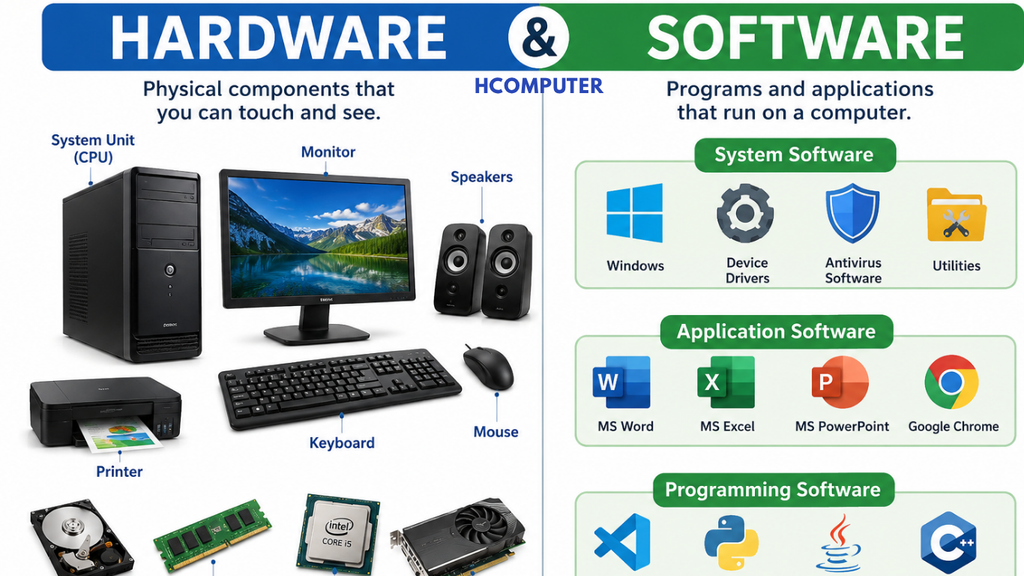
A computer system mainly consists of two major parts: Hardware and Software.
Hardware = Parts of a computer that we can physically touch.
Software = Programs/instructions that tell the hardware what to do.
1. What is Hardware?
Hardware refers to the physical components of a computer or electronic device that can be seen and touched.
Examples
- Keyboard
- Mouse
- Monitor
- CPU
- Motherboard
- RAM
- Hard disk
- SSD
- Printer
- Speakers
- Webcam
- Graphics card
Simple example
If a computer were like a human body:
Hardware = Body
Software = Instructions/brain-like control
2. Main Types of Hardware
Computer hardware can broadly be divided into:
- Input devices
- Processing devices
- Output devices
- Storage devices
- Communication/networking devices
2.1 Input Devices
Input devices are used to enter data or commands into a computer.
Examples
Keyboard
Used to enter letters, numbers and commands.
Mouse
Used to point, select, click and drag objects.
Microphone
Used to input sound.
Webcam
Used to capture images and video.
Scanner
Used to convert physical documents/photos into digital form.
Touchscreen
Allows input by touching the display.
2.2 Processing Devices
Processing hardware performs operations on data.
CPU
CPU = Central Processing Unit
The CPU executes instructions and performs calculations.
It is often called the “brain of the computer”, although technically a computer system has many components that contribute to its operation.
CPU contains important parts such as:
- ALU — Arithmetic Logic Unit
- Control Unit
- Registers
- Cache
ALU
ALU = Arithmetic Logic Unit
It performs:
- Addition
- Subtraction
- Multiplication
- Division
- Comparisons
- Logical operations
Control Unit
The Control Unit (CU) coordinates the execution of instructions.
2.3 Output Devices
Output devices present processed information to the user.
Examples:
- Monitor
- Printer
- Speakers
- Headphones
- Projector
Monitor
Displays:
- Text
- Images
- Videos
- Graphics
Printer
Produces a physical copy of digital information.
Two common categories are:
- Inkjet
- Laser
2.4 Storage Devices
Storage devices are used to store data and programs.
HDD
HDD = Hard Disk Drive
Uses magnetic disks to store data.
Advantages:
- Usually inexpensive per GB
- Large capacities available
Disadvantages:
- Mechanical parts
- Generally slower than SSDs
- More sensitive to physical shock
SSD
SSD = Solid-State Drive
Uses flash memory instead of spinning disks.
Advantages:
- Fast
- Quiet
- Low latency
- No moving mechanical parts
Other storage
- USB flash drives
- Memory cards
- External drives
- Optical discs
2.5 RAM
RAM = Random Access Memory
RAM temporarily stores data and instructions that programs are actively using.
For example, when you open a browser, the operating system and applications use RAM.
Important point
RAM is generally volatile memory.
That means:
When power is removed, the contents of RAM are normally lost.
More RAM can help a computer run more applications simultaneously, but performance also depends on the CPU, storage, operating system and software.
2.6 Motherboard
The motherboard is the main circuit board of a computer.
It provides connections between components such as:
- CPU
- RAM
- Storage
- Graphics hardware
- USB devices
- Network hardware
- Expansion cards
Think of it as the main platform that allows computer components to communicate.
2.7 GPU
GPU = Graphics Processing Unit
A GPU is designed to perform highly parallel computations, particularly graphics and visual workloads.
It is used for:
- Gaming
- 3D graphics
- Video editing
- Rendering
- AI/ML workloads
- Scientific computing
There are:
- Integrated GPUs — built into or closely integrated with the CPU/platform
- Discrete GPUs — separate graphics processors/cards
3. What is Software?
Software is a collection of programs, instructions and related data that tells a computer how to perform tasks.
Unlike hardware, software cannot be physically touched.
Examples:
- Windows
- Linux
- Android
- Microsoft Word
- Google Chrome
- Photoshop
- VLC
- Games
4. Types of Software
Software is commonly divided into:
1. System Software
2. Application Software
3. Programming Software
4.1 System Software
System software manages the computer’s hardware and provides a platform for applications.
The most important example is the Operating System (OS).
Examples of operating systems
- Microsoft Windows
- Linux
- macOS
- Android
- iOS
4.2 🪟 Operating System
An operating system manages resources and provides services for applications and users.
It manages things such as:
- CPU processes
- Memory
- Files
- Storage
- Devices
- Networking
- Security
- User accounts
Example
When you open Microsoft Word:
You → Operating System → Word → Hardware
The operating system helps Word communicate with the hardware.
4.3 Application Software
Application software is designed to help users perform particular tasks.
Examples
| Application | Purpose |
|---|---|
| Microsoft Word | Documents |
| Microsoft Excel | Spreadsheets |
| PowerPoint | Presentations |
| Google Chrome | Web browsing |
| VLC | Media playback |
| Photoshop | Image editing |
| Messaging | |
| Games | Entertainment |
4.4 Programming Software
Programming software helps developers create other software.
Examples include:
- Visual Studio
- VS Code
- IntelliJ IDEA
- GCC
- Python interpreter
- Java development tools
These tools can be used for writing, compiling, debugging and testing programs.
5. Hardware vs Software
| Hardware | Software |
|---|---|
| Physical component | Programs/instructions |
| Can be touched | Cannot be physically touched |
| Can wear out physically | Can become corrupted or obsolete |
| Requires software to be useful | Requires hardware to run |
| Example: Keyboard | Example: Windows |
| Example: RAM | Example: Chrome |
| Example: SSD | Example: Microsoft Word |
6. How Hardware and Software Work Together
Neither is very useful by itself.
For example, when you type a document:
Keyboard
Operating System
Microsoft Word
CPU + RAM
SSD/HDD
Monitor
The keyboard provides input, software processes the instructions, hardware performs the required operations, and the monitor displays the result.
7. Firmware
There is another important category called firmware.
Firmware is software stored in non-volatile memory that provides low-level control for hardware.
Examples include firmware in:
- Routers
- SSDs
- Printers
- Motherboards
- Cameras
For example, a computer’s firmware helps initialize hardware before the operating system starts.
8. Drivers
A device driver is software that allows the operating system to communicate with a particular hardware device.
Example:
Windows → Printer Driver → Printer
Without the appropriate driver, the operating system may not be able to use all of a device’s functionality.
9. Hardware + Software Example
Suppose you want to watch a YouTube video.
Hardware
- Monitor displays the video.
- CPU processes instructions.
- GPU handles graphics/video workloads.
- RAM holds actively used data.
- Network hardware receives data.
- Speakers produce sound.
Software
- Operating system manages resources.
- Browser accesses YouTube.
- Video software decodes and plays the content.
So:
Hardware performs physical operations, while software provides the instructions and logic.
10. Easy Diagram
                  COMPUTER SYSTEM
                        │
              ┌─────────┴─────────┐
              │                   │
          HARDWARE             SOFTWARE
              │                   │
      ┌───────┼───────┐     ┌─────┼─────┐
      │       │       │     │     │     │
    Input  Processing Output  OS  Apps  Tools
      │       │       │
 Keyboard    CPU     Monitor
 Mouse       RAM     Printer
 Scanner     GPU     Speakers
11. Real-Life Example
Imagine a smartphone.
Hardware
- Screen
- Processor
- RAM
- Storage
- Camera
- Microphone
- Speaker
- Battery
- Sensors
Software
- Android/iOS
- Camera app
- YouTube
- Browser
- Games
The phone works because hardware and software work together.
12. Hardware and Software Relationship
The relationship can be summarized as:
User → Software → Operating System → Hardware → Result
For example:
You click “Print”
↓
Word sends print request
↓
Operating system processes it
↓
Printer driver communicates with printer
↓
Printer produces the document
Final Definition
Hardware
Hardware is the physical part of a computer system that can be seen and touched.
Software
Software is a set of programs and instructions that tells computer hardware what to do.
Most important difference
Hardware = Physical components
Software = Instructions/programs
Both are necessary for a computer system to function.