
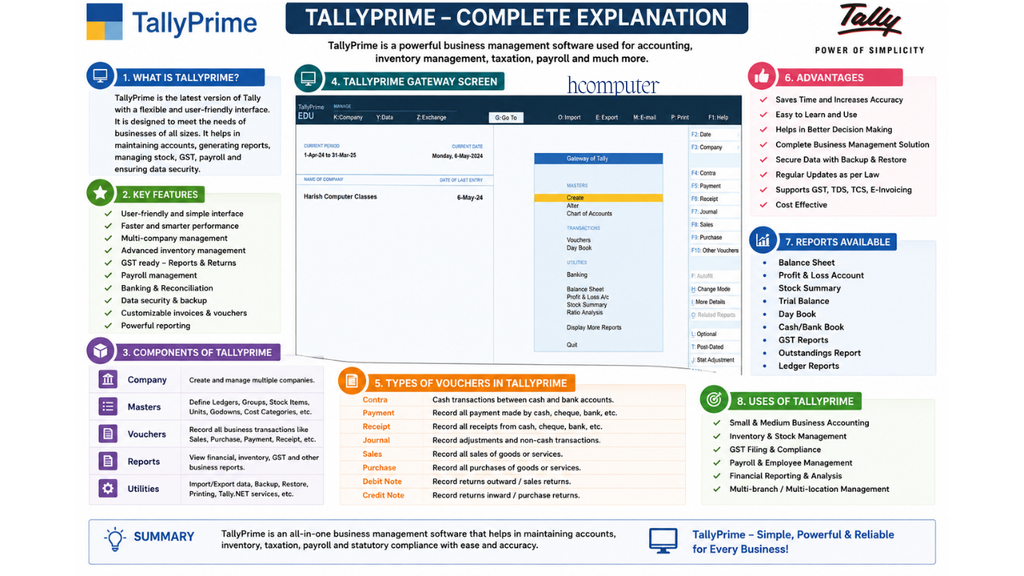
TallyPrime is popular accounting and business-management software used to record and manage the financial transactions of a business. It is widely used by shops, companies, accountants, offices, and educational institutes.
1. What is Tally?
Tally is an accounting software that helps a business maintain its financial records digitally. Instead of maintaining transactions manually in registers, we can enter them into Tally and generate different reports automatically.
Main uses of Tally
- Maintaining accounts
- Recording sales and purchases
- Managing cash and bank transactions
- Creating invoices
- Maintaining ledgers
- Managing inventory/stock
- Calculating profit and loss
- Preparing balance sheets
- Managing GST-related transactions
- Payroll and salary management
- Generating business reports
2. What is TallyPrime?
TallyPrime is the modern version of Tally accounting software. It provides tools for accounting, inventory, taxation, banking, payroll, and business reporting.
3. Important Terms in Tally
Company
A Company in Tally represents the business whose accounts you want to maintain.
Example:
ABC Traders
Ledger
A Ledger is an account used to record transactions related to a particular person, expense, income, asset, liability, etc.
Examples:
- Cash A/c
- SBI Bank A/c
- Sales A/c
- Purchase A/c
- Rent A/c
- Salary A/c
- Ram A/c
Group
Groups are used to classify ledgers.
Examples:
- Sundry Debtors
- Sundry Creditors
- Direct Expenses
- Indirect Expenses
- Sales Accounts
- Purchase Accounts
- Bank Accounts
Voucher
A Voucher is used to record a particular type of financial transaction.
Important vouchers include:
| Voucher | Purpose |
|---|---|
| F4 Contra | Cash/Bank transactions |
| F5 Payment | Payments |
| F6 Receipt | Receipts |
| F7 Journal | Adjustments |
| F8 Sales | Sales transactions |
| F9 Purchase | Purchase transactions |
| Debit Note | Purchase return/other adjustments |
| Credit Note | Sales return/other adjustments |
4. Debit and Credit
Debit and Credit are the foundation of accounting.
A simple traditional rule is:
Personal Account
Debit the Receiver
Credit the Giver
Real Account
Debit what comes in
Credit what goes out
Nominal Account
Debit all Expenses and Losses
Credit all Incomes and Gains
5. Examples of Tally Entries
Example 1: Capital Introduced
Owner started business with ₹50,000 cash.
Entry:
Cash A/c Dr. ₹50,000
To Capital A/c ₹50,000
In Tally, this is generally entered through a Receipt or Journal depending on the accounting setup and transaction circumstances.
Example 2: Purchased goods for cash
Purchased goods worth ₹10,000 for cash.
Entry:
Purchase A/c Dr. ₹10,000
To Cash A/c ₹10,000
Voucher: Purchase (F9)
Example 3: Sold goods for cash
Sold goods for ₹15,000 cash.
Entry:
Cash A/c Dr. ₹15,000
To Sales A/c ₹15,000
Voucher: Sales (F8)
Example 4: Paid rent
Paid office rent ₹5,000.
Entry:
Rent A/c Dr. ₹5,000
To Cash A/c ₹5,000
Voucher: Payment (F5)
Example 5: Received money from customer
Received ₹8,000 from Ram.
Entry:
Cash A/c Dr. ₹8,000
To Ram A/c ₹8,000
Voucher: Receipt (F6)
6. Main Modules of TallyPrime
Accounting
Used for:
- Sales
- Purchases
- Payments
- Receipts
- Journal entries
- Ledger management
Inventory
Used for:
- Stock items
- Stock groups
- Units of measurement
- Godowns
- Stock transfers
- Stock reports
GST
Used for:
- GST registration details
- GST sales
- GST purchases
- Tax calculations
- GST reports
Payroll
Used for:
- Employee records
- Attendance
- Salary calculation
- Pay slips
Banking
Used for:
- Bank transactions
- Bank reconciliation
- Cheque-related transactions
- Banking reports
7. Important Reports in Tally
Tally can automatically generate many useful reports.
Trial Balance
Shows the debit and credit balances of ledger accounts.
Profit & Loss Account
Shows the profit or loss of the business.
Profit = Income − Expenses
Balance Sheet
Shows the financial position of a business, including assets and liabilities.
Day Book
Shows transactions recorded during a particular period.
Ledger Report
Shows all transactions of a particular ledger.
Stock Summary
Shows available stock and inventory details.
Cash Book
Shows cash receipts and cash payments.
Bank Book
Shows transactions related to bank accounts.
8. Basic Tally Learning Sequence
If you are learning TallyPrime from beginner level, follow this order:
1. Accounting Basics
↓
2. Company Creation
↓
3. Groups & Ledgers
↓
4. Voucher Entry
↓
5. Purchase & Sales
↓
6. Inventory
↓
7. GST
↓
8. Banking
↓
9. Payroll
↓
10. Reports
↓
11. Practical Business Projects
For a Tally course, the most important practical topics are:
Company Creation → Ledger Creation → Voucher Entry → Purchase → Sales → Receipt → Payment → Contra → Journal → Inventory → GST → Reports.
If you want, I can also give you a complete TallyPrime course from Basic to Advanced in Hindi, chapter-wise, with 100+ practical entries and ledger examples.