
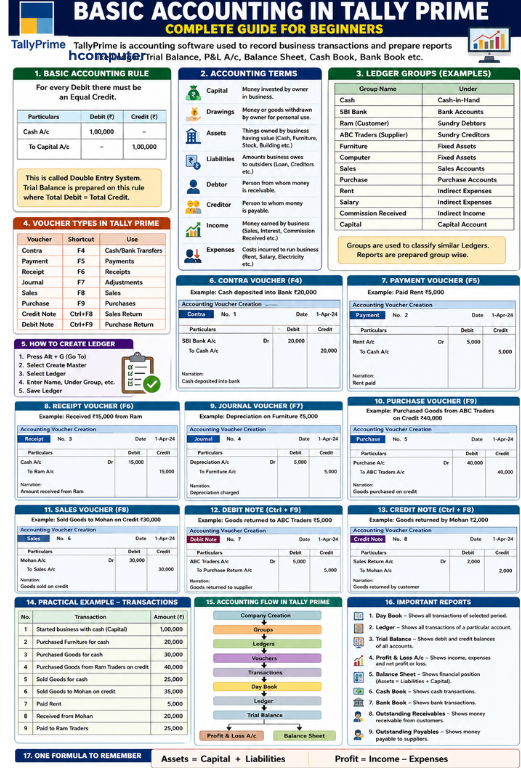
TallyPrime is accounting and business-management software used to record business transactions and prepare reports such as Ledger, Trial Balance, Profit & Loss A/c, Balance Sheet, Cash Book, Bank Book, Receivables and Payables. TallyPrime can be used for accounting alone or along with inventory, payroll and taxation features. (TallyHelp)
If you are learning TallyPrime from the beginning, you should first understand basic accounting concepts, then Groups → Ledgers → Vouchers → Entries → Reports.
1. What is Accounting?
Accounting is the process of recording, classifying, summarising and analysing the financial transactions of a business.
Example
Suppose you start a business with ₹1,00,000 cash.
The business has received capital from the owner.
Entry:
| Particular | Debit | Credit |
|---|---|---|
| Cash A/c | ₹1,00,000 | — |
| Capital A/c | — | ₹1,00,000 |
The basic rule is:
For every Debit, there must be an equal Credit.
This is called the Double Entry System. TallyPrime’s Trial Balance is designed around this principle, where total debits and credits should agree. (TallyHelp)
2. Basic Accounting Terms
Before learning TallyPrime, understand these important terms.
1. Capital
Money or assets invested by the owner into the business.
Example:
Owner starts business with ₹2,00,000.
Capital = ₹2,00,000
2. Drawings
Money or goods withdrawn by the owner for personal use.
Example:
Owner withdraws ₹10,000 for personal expenses.
Entry:
Drawings A/c Dr. ₹10,000
To Cash A/c ₹10,000
3. Assets
Things owned by the business that have economic value.
Examples:
- Cash
- Bank balance
- Furniture
- Building
- Machinery
- Computer
- Vehicle
- Stock
- Debtors
Types of Assets
Fixed Assets
- Building
- Furniture
- Machinery
- Computer
- Vehicle
Current Assets
- Cash
- Bank
- Stock
- Debtors
TallyPrime classifies current assets through groups such as Bank Accounts, Cash-in-Hand, Stock-in-Hand and Sundry Debtors. (TallyHelp)
3. Liabilities
Liabilities are amounts that the business owes to outsiders.
Examples:
- Creditors
- Bank Loan
- Outstanding Expenses
- GST/Tax payable
- Other loans
Example
You purchase goods worth ₹50,000 from Ram on credit.
Ram becomes a Creditor because the business owes him ₹50,000.
4. Debtor
A Debtor is a person or business from whom money is receivable.
Example
You sell goods worth ₹20,000 to Mohan on credit.
Mohan has to pay you ₹20,000.
Therefore:
Mohan = Debtor
In TallyPrime, customer accounts for credit sales are generally classified under Sundry Debtors. (TallyHelp)
5. Creditor
A Creditor is a person or business to whom money is payable.
Example
You purchase goods worth ₹30,000 from Sohan on credit.
You have to pay Sohan ₹30,000.
Therefore:
Sohan = Creditor
TallyPrime provides the Sundry Creditors group for such party accounts. (TallyHelp)
6. Income
Income is money earned by the business.
Examples:
- Sales
- Commission Received
- Interest Received
- Rent Received
- Service Income
TallyPrime distinguishes between sales accounts, direct income and indirect income depending on the nature of the income. (TallyHelp)
7. Expenses
Expenses are costs incurred to operate the business.
Examples:
- Rent
- Salary
- Electricity
- Telephone
- Printing
- Stationery
- Transportation
- Advertisement
- Insurance
Two Important Types
Direct Expenses: Expenses directly related to production or trading.
Examples:
- Wages
- Carriage inward
- Manufacturing expenses
Indirect Expenses: Administrative and selling expenses.
Examples:
- Office rent
- Salary
- Electricity
- Advertisement
TallyPrime uses separate groups for Direct Expenses and Indirect Expenses. (TallyHelp)
8. Accounting Rules
There are two commonly taught approaches to accounting rules.
Traditional Golden Rules
Personal Account
Debit the Receiver, Credit the Giver
Example:
Paid ₹5,000 to Ram.
Ram A/c Dr. ₹5,000
To Cash A/c ₹5,000
Real Account
Debit what comes in, Credit what goes out
Example:
Purchased furniture for cash ₹20,000.
Furniture comes into business.
Furniture A/c Dr. ₹20,000
To Cash A/c ₹20,000
Nominal Account
Debit all Expenses and Losses, Credit all Incomes and Gains
Example:
Paid rent ₹10,000.
Rent A/c Dr. ₹10,000
To Cash A/c ₹10,000
9. What is a Group in TallyPrime?
A Group is used to classify similar ledgers.
For example:
Sundry Debtors
- Ram
- Mohan
- Sohan
Sundry Creditors
- ABC Traders
- XYZ Enterprises
Indirect Expenses
- Rent
- Salary
- Electricity
TallyPrime has predefined groups and also allows users to create groups according to business requirements. (TallyHelp)
10. What is a Ledger?
A Ledger is the actual account in which transactions are recorded.
For example:
- Cash A/c
- Bank A/c
- Sales A/c
- Purchase A/c
- Rent A/c
- Salary A/c
- Ram A/c
- Furniture A/c
- Capital A/c
TallyPrime provides predefined Cash and Profit & Loss A/c ledgers, while other required ledgers can be created by the user. (TallyHelp)
11. How to Create a Ledger in TallyPrime
You can create a ledger using:
Alt + G → Create Master → Ledger
or create a ledger while recording a voucher using Alt+C. (TallyHelp)
Example: Create Rent Ledger
Name: Rent
Under: Indirect Expenses
Then save the ledger.
Example: Create Ram Ledger
Name: Ram
Under: Sundry Debtors
Example: Create ABC Traders
Name: ABC Traders
Under: Sundry Creditors
12. Important Ledger Groups
| Ledger | Under Group |
|---|---|
| Cash | Cash-in-Hand |
| SBI Bank | Bank Accounts |
| Ram | Sundry Debtors |
| ABC Traders | Sundry Creditors |
| Furniture | Fixed Assets |
| Computer | Fixed Assets |
| Sales | Sales Accounts |
| Purchase | Purchase Accounts |
| Rent | Indirect Expenses |
| Salary | Indirect Expenses |
| Wages | Direct Expenses |
| Commission Received | Indirect Income |
| Capital | Capital Account |
These classifications determine where accounts appear in reports such as the Balance Sheet and Profit & Loss A/c. (TallyHelp)
13. What is a Voucher?
A Voucher is used to record a business transaction in TallyPrime.
Important accounting vouchers include:
| Voucher | Shortcut | Purpose |
|---|---|---|
| Contra | F4 | Cash/Bank transfers |
| Payment | F5 | Payments |
| Receipt | F6 | Receipts |
| Journal | F7 | Adjustments |
| Sales | F8 | Sales |
| Purchase | F9 | Purchases |
| Credit Note | Ctrl+F8 | Sales return/credit adjustment |
| Debit Note | Ctrl+F9 | Purchase return/debit adjustment |
TallyPrime provides predefined voucher types and also allows voucher types to be customised. (TallyHelp)
14. Contra Voucher – F4
Contra is generally used for transactions involving Cash and Bank accounts.
Example 1: Cash deposited into Bank
₹20,000 deposited into SBI Bank.
Entry:
SBI Bank A/c Dr. ₹20,000
To Cash A/c ₹20,000
In TallyPrime:
F4 → Contra
Example 2: Cash withdrawn from Bank
₹10,000 withdrawn from bank.
Cash A/c Dr. ₹10,000
To SBI Bank A/c ₹10,000
15. Payment Voucher – F5
Payment voucher is used when the business makes a payment.
Examples:
- Rent paid
- Salary paid
- Electricity bill paid
- Supplier paid
- Stationery purchased for cash
Example
Paid rent ₹8,000 by cash.
Rent A/c Dr. ₹8,000
To Cash A/c ₹8,000
In TallyPrime:
F5 → Payment
TallyPrime supports payment recording through both single-entry and double-entry modes. (TallyHelp)
16. Receipt Voucher – F6
Receipt voucher is used when the business receives money.
Example
Received ₹15,000 from Ram.
Cash A/c Dr. ₹15,000
To Ram A/c ₹15,000
In TallyPrime:
F6 → Receipt
Receipt vouchers can record cash and bank receipts. (TallyHelp)
17. Journal Voucher – F7
Journal is mainly used for adjustment and non-cash accounting entries.
Example 1: Depreciation
Depreciation on furniture ₹5,000.
Depreciation A/c Dr. ₹5,000
To Furniture A/c ₹5,000
Example 2: Outstanding Salary
Salary outstanding ₹10,000.
Salary A/c Dr. ₹10,000
To Outstanding Salary A/c ₹10,000
18. Purchase Voucher – F9
Purchase voucher is used to record purchases.
Cash Purchase
Purchased goods for ₹25,000 cash.
Purchase A/c Dr. ₹25,000
To Cash A/c ₹25,000
Credit Purchase
Purchased goods worth ₹40,000 from ABC Traders.
Purchase A/c Dr. ₹40,000
To ABC Traders A/c ₹40,000
19. Sales Voucher – F8
Sales voucher is used to record sales.
Cash Sale
Sold goods for ₹30,000 cash.
Cash A/c Dr. ₹30,000
To Sales A/c ₹30,000
Credit Sale
Sold goods worth ₹50,000 to Ram.
Ram A/c Dr. ₹50,000
To Sales A/c ₹50,000
20. Debit Note
Debit Note is commonly used for purchase returns and certain debit adjustments.
Example
Goods worth ₹5,000 returned to ABC Traders.
ABC Traders A/c Dr. ₹5,000
To Purchase Return A/c ₹5,000
21. Credit Note
Credit Note is commonly used for sales returns and certain credit adjustments.
Example
Ram returned goods worth ₹3,000.
Sales Return A/c Dr. ₹3,000
To Ram A/c ₹3,000
22. Complete Practical Example in TallyPrime
Suppose you start a business called ABC Enterprises.
Transaction 1
Started business with cash ₹1,00,000.
Cash A/c Dr. ₹1,00,000
To Capital A/c ₹1,00,000
Transaction 2
Purchased furniture for ₹20,000 cash.
Furniture A/c Dr. ₹20,000
To Cash A/c ₹20,000
Transaction 3
Purchased goods for cash ₹30,000.
Purchase A/c Dr. ₹30,000
To Cash A/c ₹30,000
Transaction 4
Purchased goods from Ram Traders on credit ₹40,000.
Purchase A/c Dr. ₹40,000
To Ram Traders A/c ₹40,000
Transaction 5
Sold goods for cash ₹25,000.
Cash A/c Dr. ₹25,000
To Sales A/c ₹25,000
Transaction 6
Sold goods to Mohan on credit ₹35,000.
Mohan A/c Dr. ₹35,000
To Sales A/c ₹35,000
Transaction 7
Paid rent ₹5,000.
Rent A/c Dr. ₹5,000
To Cash A/c ₹5,000
Transaction 8
Received ₹20,000 from Mohan.
Cash A/c Dr. ₹20,000
To Mohan A/c ₹20,000
Transaction 9
Paid ₹25,000 to Ram Traders.
Ram Traders A/c Dr. ₹25,000
To Cash A/c ₹25,000
23. Accounting Flow in TallyPrime
You can remember TallyPrime accounting using this flow:
Company Creation
Groups
Ledgers
Vouchers
Transactions
Day Book
Ledger
Trial Balance
Profit & Loss A/c
Balance Sheet
This is the basic accounting cycle.
24. Important Reports in TallyPrime
After entering transactions, TallyPrime automatically provides accounting reports.
1. Day Book
Shows transactions recorded during a selected period.
2. Ledger
Shows transactions related to a particular account.
For example, the Cash Ledger shows cash-related transactions.
3. Trial Balance
Shows debit and credit balances of accounts.
4. Profit & Loss A/c
Shows the business’s income, expenses and resulting profit or loss.
5. Balance Sheet
Shows assets, liabilities and capital.
6. Cash Book
Shows cash transactions.
7. Bank Book
Shows bank transactions.
8. Outstanding Receivables
Shows money receivable from customers.
9. Outstanding Payables
Shows money payable to suppliers.
TallyPrime provides these accounting and financial reports for analysing business performance and financial position. (TallyHelp)
25. How to Check a Ledger
You can go to:
Alt+G → Ledger Vouchers
and select the required ledger.
TallyPrime’s Ledger Vouchers report displays ledger-wise transactions with their corresponding voucher details. (TallyHelp)
For example, if you want to check Ram’s account, open Ram’s ledger and you can see:
| Date | Particulars | Debit | Credit |
|---|---|---|---|
| 01-04 | Sales | ₹50,000 | — |
| 05-04 | Cash | — | ₹20,000 |
| 10-04 | Cash | — | ₹10,000 |
| Balance | ₹20,000 |
So Ram still owes the business ₹20,000.
26. Most Important TallyPrime Concepts for Beginners
Learn these topics in this order:
Level 1 – Accounting Basics
- What is Accounting?
- Debit and Credit
- Assets
- Liabilities
- Capital
- Drawings
- Income
- Expenses
- Debtors
- Creditors
Level 2 – TallyPrime Basics
- Company Creation
- Company Alteration
- Groups
- Ledgers
- Voucher Types
- Voucher Entry
- Day Book
- Ledger Reports
- Trial Balance
- Profit & Loss
- Balance Sheet
Level 3 – Practical Accounting
- Cash Purchase
- Credit Purchase
- Cash Sale
- Credit Sale
- Payment
- Receipt
- Contra
- Purchase Return
- Sales Return
- Journal Entries
Level 4 – Advanced TallyPrime
- Inventory
- Stock Groups
- Stock Items
- Units
- Godowns
- GST
- TDS
- Payroll
- Bank Reconciliation
- Cost Centres
- Outstanding Reports
- Financial Analysis
Quick Revision Chart
| Concept | Meaning | Example |
|---|---|---|
| Capital | Owner’s investment | ₹1,00,000 |
| Drawings | Owner’s withdrawal | ₹10,000 |
| Asset | Business property/resource | Furniture |
| Liability | Amount payable | Loan |
| Debtor | Amount receivable | Customer |
| Creditor | Amount payable | Supplier |
| Income | Money earned | Commission |
| Expense | Money spent/incurred | Rent |
| Purchase | Goods bought | ₹50,000 |
| Sales | Goods sold | ₹70,000 |
| Payment | Money paid | Rent paid |
| Receipt | Money received | Customer payment |
| Contra | Cash/Bank transfer | Cash deposited in Bank |
| Journal | Adjustment entry | Depreciation |
| Ledger | Individual account | Cash A/c |
| Group | Classification of ledgers | Sundry Debtors |
| Voucher | Transaction entry document | Payment Voucher |
One formula to remember
Assets = Capital + Liabilities
And for business performance:
Profit = Income − Expenses
Official TallyPrime learning resources
For current TallyPrime procedures, the official TallyHelp documentation covers company setup, accounting masters, vouchers, ledgers, reports and other features. (TallyHelp)
If you’re learning this for a TallyPrime course, the best next lesson is “How to create a company + create all basic ledgers + pass 20 practical voucher entries”.